
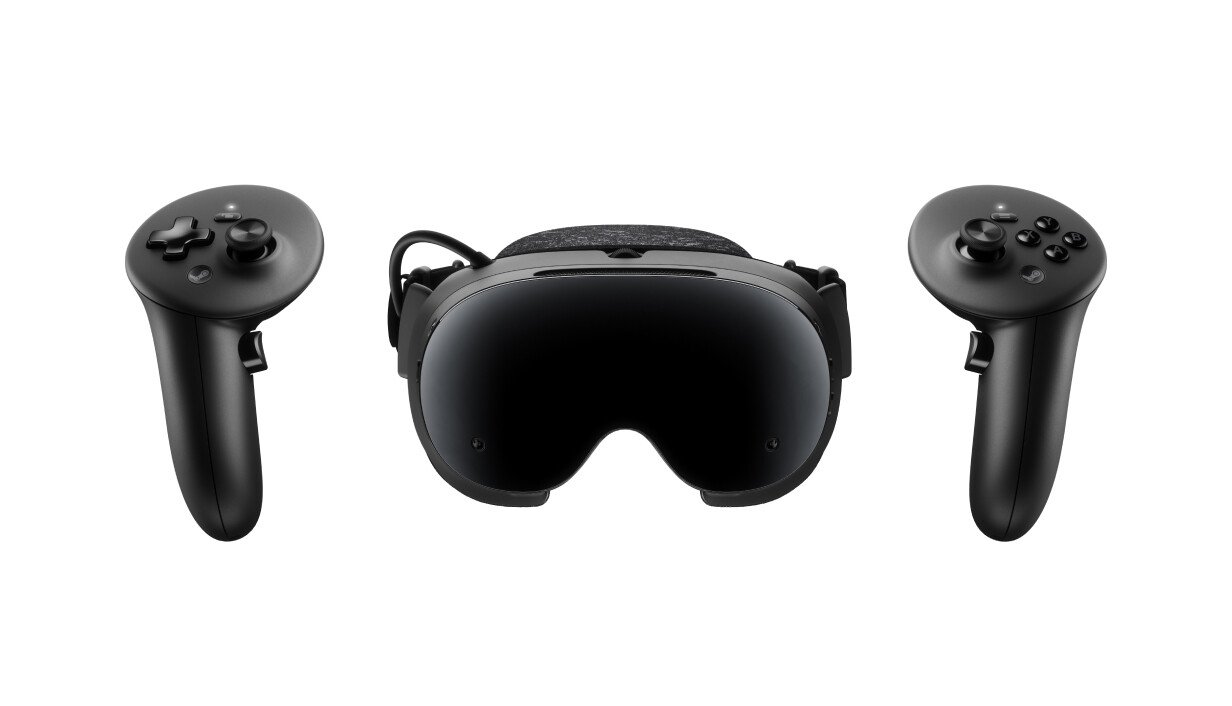

Every other headset guide leads with the panel. Here, the lead is the operating system, because it decides everything downstream. The Frame runs SteamOS, Valve’s own Linux build, not Android like the Quest line and not Windows. That single choice is why this headset gets written about differently than any Meta device: Steam has a public policy that allows adult-only sexual content on its store, hidden from search by default and opt-in through account preferences. The Quest store has never allowed that at any setting.
It works two ways. Standalone, it runs on a Qualcomm Snapdragon 8 Gen 3 chip with 16GB of RAM, no PC needed, with over a hundred titles already certified for standalone play. Or it streams a full SteamVR session wirelessly from a gaming PC, over the WiFi 6E adapter Valve puts in the box. There’s no cable option in between. No DisplayPort, no HDMI. Whatever lands on the lenses either renders on the headset itself or travels over your WiFi, which makes your router the thing standing between you and a clean picture, not a cable drawer.
Price and What’s Actually in the Box
Two storage tiers, both already shipping:
| Tier | USD | EUR |
|---|---|---|
| 256GB kit | $1,059 | €1,049 |
| 1TB kit | $1,299 | €1,279 |
Each kit includes the headset, the Steam Frame controllers, the WiFi 6E streaming adapter, and a code for Half-Life: Alyx. What it doesn’t include is a charger. Valve’s own 45W USB-C power supply is a separate $29 (€39) purchase, so budget for it before your first session, not after. A full-color passthrough camera is roughly a $149 add-on, and a $59 kit covers grip straps and a spare battery door if you want either.
This is not the budget entry into VR porn. It’s priced for someone who already knows they want this platform’s ceiling and is willing to pay Valve’s price for it.
Why the Hardware Matters Here Specifically
Three things on the spec sheet do more work for VR video than they do for gaming, which is worth knowing since most Frame coverage was written by people reviewing it as a game console.
The panel
Dual LCD screens at 2160×2160 pixels per eye, behind multi-element pancake lenses, at a 110-degree field of view Valve itself calls conservative. That’s a denser image than most standalone headsets sold today, and pancake lenses mean less of the edge-softening and god-ray glare that cheaper Fresnel lenses throw off bright, well-lit scenes.
The IPD dial
A physical wheel adjusts the distance between the lenses to match your own eyes. Valve hasn’t published the exact millimeter range, but the fact that it’s a dial you turn mid-session, not a menu buried three screens deep, matters more here than in any shooter review. A mismatched IPD is the single most common reason VR video looks soft, and our format guide covers why no amount of source quality fixes that on its own.
Controllers included, not optional
Every kit ships with a pair of ringless controllers: 18 IR LEDs each for tracking, TMR thumbsticks that won’t drift the way older potentiometer sticks do, and a single AA battery good for around 40 hours per controller. You’re not buying accessories separately to get full input.
Setting It Up for VR Porn
- Streaming from a PC
This is the path every SteamVR headset already uses, and the Frame doesn’t change the routine. Plug the bundled WiFi 6E adapter into your gaming PC, connect the headset to the same network, and launch SteamVR as usual. Set the IPD dial before you press play. From there, DeoVR and HereSphere both already exist as native Steam apps on PC, and since streaming just mirrors your PC’s SteamVR session to the headset, there’s no reason to expect them to behave differently here than on any other tethered or wireless SteamVR device. - Standalone, through the browser
This is the part that didn’t exist on paper before launch and turned out to be the most useful thing for adult content. The Frame runs a full, unmodified Google Chrome browser, opened from a SteamVR dashboard app onto a virtual screen inside the headset. That means the simplest route on a Quest, opening a video site directly and pressing play, works here too, no sideloading required. - Standalone, through Android apps
Valve built an Android-in-Linux compatibility layer called Lepton that runs Android APKs directly, as long as the app doesn’t require Google Play Services. A third-party tool called FrameDrop pushes APKs from a PC onto the headset if you’d rather not download them through the browser itself. What isn’t confirmed is whether DeoVR, HereSphere, SLR, or Skybox actually ship a standalone build for this layer yet. One low-confidence forum mention suggested a standalone HereSphere build still needs to be built. Until someone shows it working, treat the browser as the reliable standalone route.

The Battery Reality
Road to VR’s reviewer measured 1 to 1.5 hours of real mixed-use battery life, switching between Valve’s performance and playtime power presets. Valve has never published its own number, so that measured range is the only figure worth trusting, and it’s noticeably shorter than the roughly 2 hours the same reviewer got out of a Quest 3.
A single scene runs 30 to 60 minutes on its own. Two back to back puts you at the edge of a charge or past it. Valve’s answer is a swappable battery and USB-C powerbank charging while the headset is running, both of which work, and neither of which changes the math: a long evening on this headset means keeping a spare battery topped up or wearing a powerbank at the back of your head, not putting it on and forgetting about it for three hours.
Content Access and Regional Rules
Steam’s own policy allows adult-only sexual content on the store, but it’s hidden from search and browsing by default. You turn it on yourself, in your account’s content preferences, the same setting that’s applied to every other headset and every other device running Steam. Nothing about the Frame changes that toggle.
Regional rules on top of that keep shifting. The UK’s Online Safety Act, for one, now requires a linked credit card to unlock 18+ rated content on Steam, including titles with no sexual content at all. Whether the Frame carries any content filter beyond the standard Steam Store rules hasn’t been documented anywhere. Streaming a video site through the headset’s own browser is a separate matter from Steam Store purchases either way.
What the Reviews Actually Said
Engadget’s Devindra Hardawar scored it 6.5 out of 10, under the headline “Solid Standalone VR That’s Too Little, Too Late.” His pros: strong standalone performance, comfortable to wear without glasses, and stable PC streaming. His cons: the price, weak built-in speakers, and a thin new-content library at launch. His summary line: “it just feels like a wasted opportunity.”
Road to VR gave no numeric score but ran the most detailed hands-on, calling the Frame a “power-user’s playground,” with zero complaints about tracking latency and praise for the WiFi 6E dongle, alongside the same battery ceiling covered above.
Neither review tested adult VR video playback. Both are gaming reviews written by gaming reviewers, which is the gap this guide exists to fill.
What’s Coming: Meta VR Glasses
Meta announced its own VR Glasses on September 23, priced at $1,299.99 with a spring 2027 ship window: roughly 100 grams of glasses with no onboard computing, tethered to a separate puck that holds the battery and chip. It runs the same Horizon OS as the Quest line, so it inherits Meta’s store rule against pornographic apps. That rule has never stopped Quest owners, who watch through the browser and third-party players instead, but whether those routes work on the glasses won’t be known until they ship. Our full breakdown covers what we know so far, and we will publish a setup guide the day they arrive.
Should You Get One for This?
If you already own a Quest and don’t have a reservation invite, there’s no reason to wait on a device you can’t buy on demand yet. Pick a source with a deep library, like VRPorn.com, and keep watching on what you’ve got. If you’ve got a gaming PC, a Steam library you actually use, and an invite in hand, the wireless streaming path and the panel resolution both make a real case for this over anything else on the market right now. If this would be your first headset ever, the price and the reservation queue both argue against starting here. Our headset guide covers what to buy today instead.
FAQ
Only through Valve’s reservation queue. It isn’t sold as an open pre-order or in retail. The first invitation wave went out shortly after the September 14 launch, and Valve hasn’t said when the rest of the waitlist gets access.
$1,059 for the 256GB kit, $1,299 for the 1TB kit (€1,049 and €1,279). Neither price includes Valve’s own charger, which is a separate $29 purchase.
Through PC streaming, yes, in practice. DeoVR already exists as a native Steam app for PC, and the Frame’s wireless streaming just mirrors that PC session to the headset. A standalone build running directly on the Frame’s own Linux layer hasn’t been confirmed by anyone yet.
No. The Frame runs standalone on its own chip, browser included. A PC unlocks wireless streaming and your existing Steam library, but the headset works without one.
Too early to call outright. Both launch reviews covered gaming, not VR video playback, and neither tested adult content. On paper, the higher per-eye resolution and the physical IPD dial are real advantages over the Quest 3. Whether that shows up in a better picture during actual VR video hasn’t been tested by anyone independent yet.
Don’t count on it. The headset is built around controller input: every kit ships with a pair of tracked controllers, ringless with IR LED tracking and TMR thumbsticks, so you’re covered out of the box without buying anything extra.
Disclaimer
Some links are affiliate links — we may earn a commission at no extra cost to you. Tested on our own Quest 3.